
Turn the moments you flagged into video
You tapped to log a close call. Your camera was already recording. BumpyRide Clip puts those two things together — it reads the ride, lines the footage up against it, and cuts out the seconds around each thing you flagged.
Nothing is uploaded. It is a Mac app that reads your video files where they already sit — no account, no server, no network connection, and nothing to install alongside it.
Version 1.0.2 · 1.4 MB · macOS 26.2 or later · universal, for Apple silicon and Intel · signed and notarized by Apple, so it opens with a double-click.
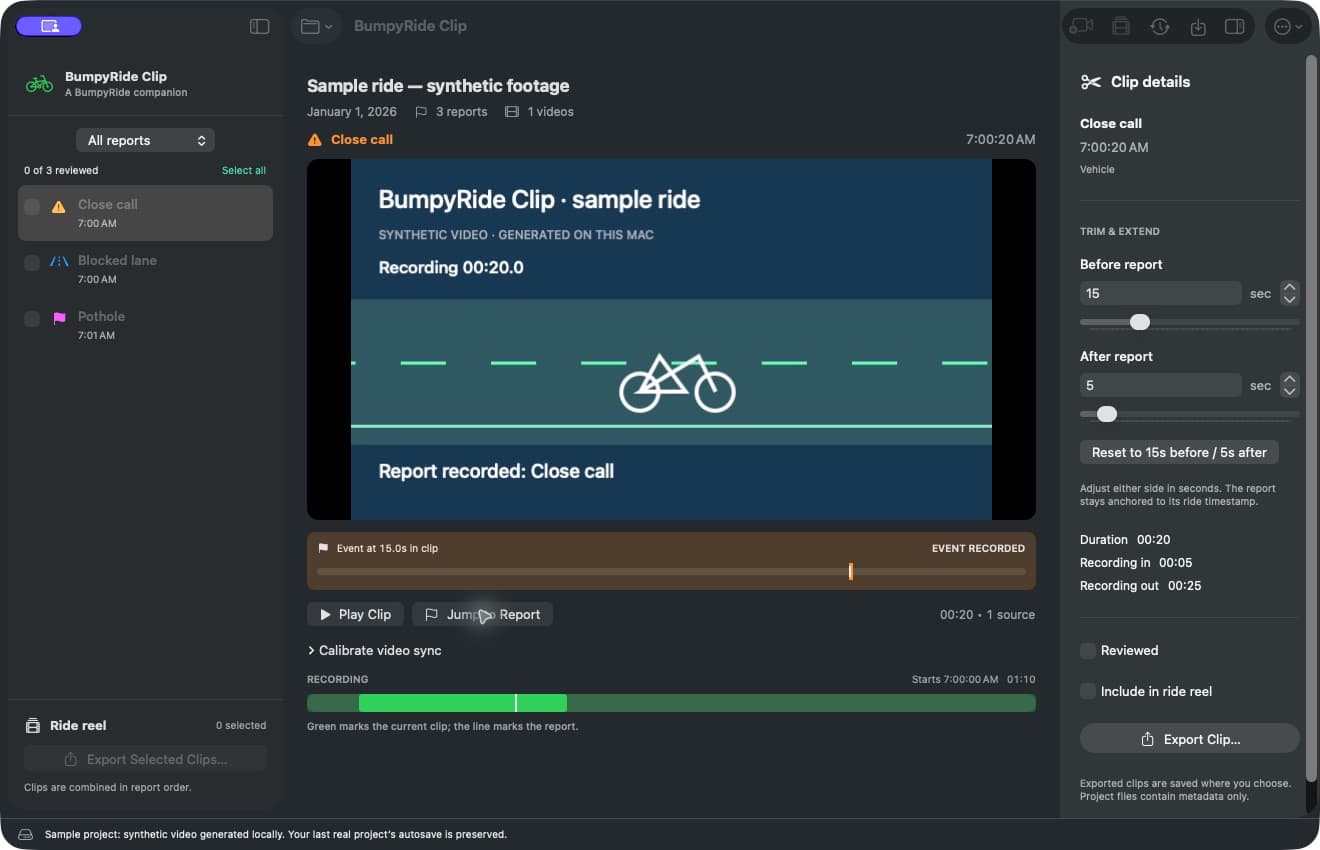
Open a ride, link the footage, and work through what you flagged. Shown on the built-in sample project, which generates its own footage so you can try the whole thing before committing a ride to it.
What it actually does
Every close call, blocked lane, and custom event you logged turns into one entry to review. Hard brakes are left out — they are detected after the fact, not moments you chose.
Point it at the video files from the same ride. It links them where they sit, in order, including files well over 4 GB, and never makes a second copy.
Take a single moment, or tick several and export them as one video in ride order. Clips can even span two camera files.
Not sure yet? Open the built-in sample project. It generates its own short video on your machine — nothing to download, no footage of yours involved — so you can click through the whole workflow before deciding it is worth pointing at a real ride.
The trick: a report called “Video Sync”
The hard part of matching a ride to footage is knowing exactly when the video started. Camera clocks drift, filenames lie, and embedded timestamps disagree with each other — so the tool ignores all of them.
Instead you tell it, using the app you already have. Start your camera, then log a custom event in BumpyRide named Video Sync. That report is a timestamp you trust, taken from the same clock as every other report on the ride — so everything else falls into place from it.
- 1. Start your camera recording.
- 2. In BumpyRide, tap Log Event and name it Video Sync.
- 3. Ride, and flag things as you normally would.
The name is matched loosely — “video sync”, “Video-Sync” and “videosync” all work.
The app finds that marker and uses it as frame zero, then places every other report relative to it. No marker on an older ride? Type the real start time in yourself.
Nudge the whole ride a tenth of a second at a time until it sits right — or skip the arithmetic entirely: scrub until the frame where it actually happened is on screen, pause, and choose Match event to this frame. The correction applies to every report on the ride and is saved with the project, so you only do it once.
Trim it until it says what you mean
Each clip starts as the 15 seconds before the moment you flagged and 5 after — enough of the approach to see it coming. Drag the handles out to show more, or pull them in to the two seconds that matter.
Found a length that works? Tick the other reports and apply the same timing to all of them at once. A playback bar counts down to the flagged moment, marks it, then counts up again — a review aid only, never burned into what you export.
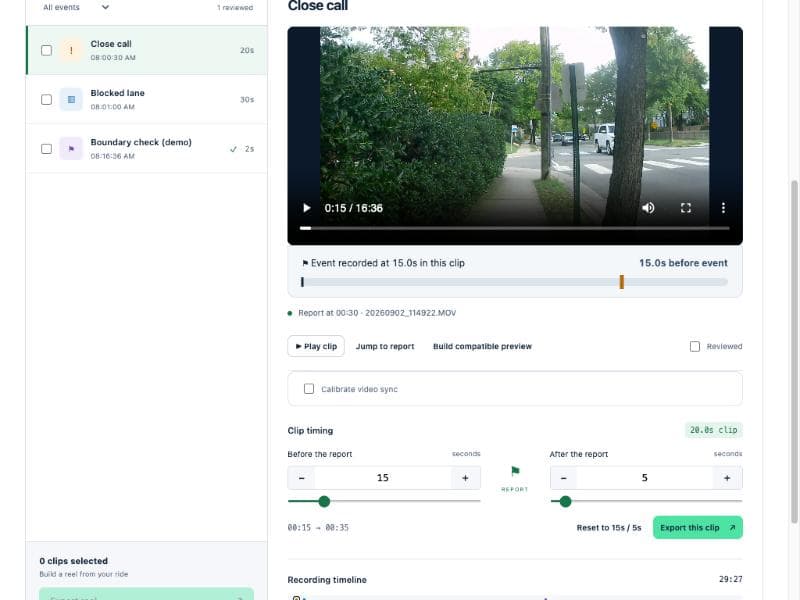
Trimming a clip in the browser version, which works the same way.
It never leaves your computer
Helmet-camera footage is about as personal as data gets. This tool is built so that none of it has to be trusted to anyone — including us.
- There is nowhere to send it. The Mac app needs no network connection at all. No account, no server, no database, no analytics.
- Your originals are read, not copied. Videos are linked where they already live. Exports are new files, and nothing existing is ever overwritten or deleted.
- Project files carry no video. Saving a project stores report times, your trim points, and enough of a fingerprint to recognise the same source files later — no footage, no GPS trace. The Mac app also saves a bookmark so it can reopen your videos without asking again, and that can record where those files live — so treat a project file as personal metadata, not something to post publicly.
- Finishing up clears the workspace. Half-finished renders are cleaned up when you finish a project or quit, and previews are built in memory rather than written out as extra video files.
Getting it
Download and open it
It is signed and notarized by Apple, so it opens like any other app — no Gatekeeper warning, no right-click-to-open trick, nothing to build. Drag it to Applications and you are done.
1.4 MB · requires macOS 26.2 or later · universal binary. Nothing else to install — no Node, no FFmpeg, and it never needs the network. Release notes and checksums.
Run the browser version instead
The Mac app grew out of an earlier version that runs anywhere Node does. Same reports, same Video Sync alignment, same calibration — it just runs as a small web app on your own machine instead, which you open in a browser at 127.0.0.1:4317.
git clone https://github.com/direwolfvm/bumpyride-clip
cd bumpyride-clip
npm install
npm start
Needs Node.js 22 or newer. The first install pulls down FFmpeg, which does the video work; after that it runs offline too. Projects saved in either version open in the other.
Away from a Mac, point it at a folder of downloaded rides with BUMPYRIDE_RIDES_DIR, then link your videos by path.
Both versions are open source — the Mac app and the browser app live in the same repository.
Exporting re-encodes video so the cuts land in the right place, which takes real time on long clips. Accurate beats instant here.
SHA-256: 727144e0107c3b597e691f6d306332d79381dd48c7837156332fe46e0cb387d5 — also published as SHA256SUMS.txt on the release.
Have footage sitting on a drive?
The moments are already marked in your rides. This just finds them.
Download for Mac — freeNot on a Mac? Run the browser version.
New to BumpyRide? Start with the app.